Engineering Modern Webshops for Scale and High Speed
A technical guide to modern webshop development using Nuxt and edge computing.

Webshop development is the end-to-end software engineering process of building an independent online store (Direct-to-Consumer). This covers designing the catalog, shopping cart, and order management, right through to payment and logistics integration. A modern approach separates the frontend interface from the backend logic using headless commerce architecture to guarantee instant load times and cross-channel scalability.
Today, building an online store requires more than installing a theme on a traditional CMS and adding dozens of plugins. The digital market demands interaction times under one second and real-time stock synchronization across multiple sales channels. As a developer designing web systems and product interfaces, I often see retail businesses held hostage by monolithic architectures that slow down drastically during traffic spikes.
This article explains the blueprint for modern online store engineering using the Nuxt ecosystem, TypeScript, edge computing on Cloudflare Workers, and Python automation to connect independent web catalogs with popular marketplaces in Indonesia.
Architectural Shifts in Modern Webshop Development
For years, most business owners relied on monolithic architectures like standard WooCommerce or Magento. In a monolithic structure, the catalog database, transaction processing, and HTML rendering merge within a single server. When hundreds of users access a promo page at the same time, the database workload instantly slows down interface rendering.
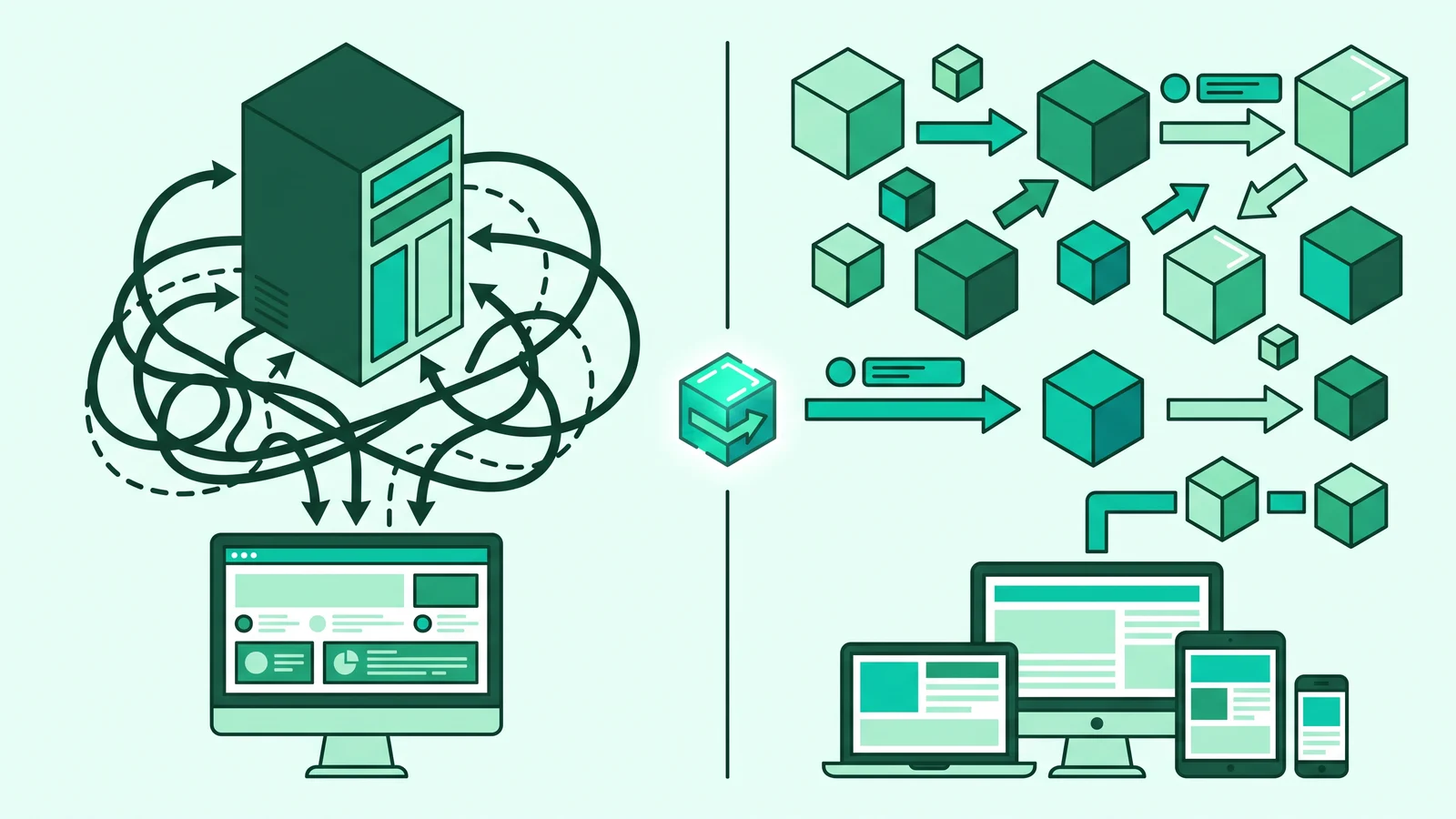
Modern software engineering now shifts toward Headless or Composable Commerce. We separate the presentation layer (storefront) from the backend business logic engine. Development teams build the front interface using Vue and Nuxt frameworks, while product management, shopping carts, and payments communicate through REST APIs or GraphQL.
This separation provides three key technical advantages for brand owners:
- Extreme Load Speeds: A CDN (Edge Network) closest to the buyer's location directly serves product catalog pages without waiting for database queries from a central server.
- Isolated Security: Attacks on the public interface do not directly expose transaction databases or customer information because they run in separate computing environments.
- Omnichannel Flexibility: The same single product data source can serve desktop websites, mobile apps, physical point-of-sale (POS) systems, and automated integrations to third-party marketplaces.
The following table compares technical characteristics between conventional monolithic systems and modern headless commerce architecture:
Choosing a headless architecture does not mean you have to build everything from scratch. You can still use ready-made backend engines or read the headless Nuxt WordPress architecture guide if your content team is already used to a familiar product management interface.
Core Web Vitals Standards for E-Commerce Storefronts
Online store speed directly correlates with revenue. E-commerce industry research shows a one-second delay in mobile load times can drop conversion rates by up to 20%. Unfortunately, global web performance analytics data from the HTTP Archive (Web Almanac 2025) reveals that the Largest Contentful Paint (LCP) metric remains the biggest stumbling block for e-commerce sites. Only about 48% of mobile sites manage to pass all three Core Web Vitals metrics at once.
Google sets strict thresholds that every modern webshop development project must meet:
- LCP (Largest Contentful Paint) ≤ 2.5 seconds: Measures the load time of the largest visual element (usually the main product photo or campaign banner) until it fully appears on the user's screen.
- INP (Interaction to Next Paint) ≤ 200 milliseconds: This metric, replacing FID, measures page responsiveness when a user taps a size variant, selects a color, or presses the "Add to Cart" button.
- CLS (Cumulative Layout Shift) ≤ 0.1: Ensures the page layout does not shift suddenly when images or pricing components finish loading, so users do not accidentally press the wrong button.
Reaching these numbers in the Indonesian market, where network conditions vary, is highly risky if you only rely on a pure Single Page Application (SPA). We need a Hybrid Rendering strategy from Nuxt 3.
Building High-Performance Product Components with Nuxt 3 and TypeScript
The Nitro engine behind Nuxt 3 allows the application of Server-Side Rendering (SSR) or Incremental Static Regeneration (ISR) specifically on product detail pages. The server or edge network renders the page into complete HTML, so search engines can accurately index product metadata and users instantly see content without a blank white screen.
The most effective technique to conquer LCP metrics on product pages is optimizing the main image load using the @nuxt/image module and strict TypeScript typing. Here is an implementation of a main product card component that complies with Core Web Vitals standards:

Notice the loading="eager" and :preload="{ fetchPriority: 'high' }" attributes in the code above. These instructions tell the browser to download the product photo as early as possible before processing analytics scripts or other secondary assets, keeping the LCP score under 2.5 seconds. You can also combine this structure with the guide to fast interfaces with Nuxt UI so interactive components like the shopping cart drawer remain lightweight without burdening the browser's Main Thread.
Omnichannel Architecture: Independent Webshops and Shopee Integration
When discussing web development trends in Indonesia with retail business owners, a dichotomous debate often arises: is it better to focus on selling on marketplaces like Shopee or to build an independent online store? That question misses the mark. The most profitable engineering approach does not pick one, but instead positions the independent webshop as a Single Source of Truth (SSOT) or primary data hub, while marketplaces act as peripheral distribution channels.
Relying entirely on marketplaces will erode profit margins due to platform commission cuts. In addition, brand owners lose full access to customer behavior data (first-party data) and always face the risk of algorithm changes or unilateral account suspensions.
On the other hand, managing stock manually in two different places is highly prone to triggering overselling (items sold on Shopee even though the last stock was just bought by a customer on the website). The solution is to integrate the webshop database with the Shopee Open Platform API v2.
Automating Stock Synchronization with Python and Shopee API v2
In the webshop and Shopee integration workflow, every stock deduction in the main database must immediately send an update signal to the Shopee server. The official Shopee Open Platform v2 documentation requires every API request to have a cryptographic signature based on HMAC-SHA256. The system builds this signature from a combination of partner_id, the API endpoint path, timestamp, access_token, and shop_id.
Here is a Python-based automation script that works as a background worker to automatically sync product stock from an independent webshop to a Shopee store account:

Access tokens (access_token) on the Shopee Open Platform v2 are only valid for 4 hours. Ensure your backend architecture has an automated scheduler (cron job) to update the token using the refresh_token before it expires, so the stock sync queue does not break during peak transaction hours.
Edge Computing for Domestic E-Commerce Performance
A classic problem for e-commerce projects in Indonesia is server infrastructure placement. Many developers rent conventional Virtual Private Servers (VPS) abroad to get cheaper prices. As a result, data packets from users in Jakarta, Surabaya, or Medan have to travel back and forth over international network routes before a product page opens.
A modern approach uses Edge Computing with Cloudflare Workers. By placing Nuxt rendering logic and catalog APIs on the edge network, data centers (edge nodes) in Jakarta and other major Indonesian cities will execute the application code directly. This step pushes network wait times or Time to First Byte (TTFB) close to zero milliseconds.
To keep the shopping cart system consistent without sacrificing caching speed, split data handling into two paths at the edge layer:
- Public Catalog Data: Aggressively cache product descriptions, base prices, and category lists on the Cloudflare Cache API. When thousands of people open the same promo page, the main server does not need to reprocess these requests.
- Shopping Cart Session Data: Store user-specific data such as cart contents, active discount coupons, and authentication status in low-latency storage like Cloudflare KV or the Cloudflare D1 distributed SQL database.
For those who want to understand how data storage works on this edge network, read the discussion on modern backend architecture, distributed edge, and SQLite.
Separating Static Catalogs and Dynamic Stock
Design product pages to render descriptive information from a static cache, while the application fetches stock availability numbers asynchronously in the background (lightweight client-side fetch) or validates them directly at the Edge KV layer when the page loads.
Applying Atomic Inventory Locks During Checkout
When a user presses the pay button, run an atomic lock mechanism (atomic decrement) in Redis or a message queue system. This step holds the stock amount during the payment time limit to prevent race conditions when two buyers fight for the last item at the exact same second.
Setting Up Payment and Logistics Webhooks
Connect your edge worker endpoints with local payment gateway webhooks (such as Midtrans or Xendit). When a successful payment notification arrives, the worker immediately deducts permanent stock, triggers the Python script to update Shopee stock, and requests an automatic tracking number from the logistics courier API.
Common Technical Mistakes That Destroy Online Store Conversions
Building features until they work on a local computer (localhost) is very different from maintaining system stability when thousands of users shop at the same time. Here are three architectural traps that most often fail online store performance:
1. Blocking the Main Thread with Excessive Tracking Scripts
Marketing teams often request the installation of various third-party scripts: from social media ad pixels and analytics screen recorders to heavy live chat widgets. Loading all these scripts synchronously will block the browser's Main Thread. As a result, when a buyer presses the "Buy Now" button, the screen freezes and the INP score worsens past 200 ms. Apply code-splitting, move heavy computing to Web Workers, and prioritize optimistic UI updates in Nuxt.
2. Relying on Standard Database Queries During Flash Sales
Using standard SQL queries without proper transaction locking during a flash sale campaign is a recipe for disaster. When hundreds of requests come in at the exact same millisecond, the database experiences a race condition that leads to negative stock. The store has to cancel orders from customers who have already paid, damaging the brand's reputation. Always use a message queue mechanism like Cloudflare Queues or RabbitMQ to process stock reductions sequentially.
3. Over-Polling Marketplace APIs
To check for new orders on Shopee, some developers create scripts that poll the Shopee API every minute. This wastes server resources and runs a high risk of getting blocked for violating API rate limits. Use the Webhook listeners feature from the Shopee Open Platform so your server only works when it receives order mutation notifications in real time.
Guide to Choosing a Website Development Vendor in Jakarta and Indonesia
Not all companies have an internal engineering team to build systems from scratch. For brand owners or operational directors in Jakarta and other major cities selecting a website development vendor, the evaluation process must go beyond just the visual beauty of a portfolio.
Many traditional vendors offer online store packages simply by installing instant CMS themes stuffed with heavy plugins. Without careful architectural design, the site will quickly slow down and fail to handle campaign traffic spikes or local payment integrations.
Use the following technical checklist before you sign a webshop development contract:
- Include Core Web Vitals Targets in the SLA Clause: Do not just accept a verbal promise that the site will run fast. Put it in writing within the Service Level Agreement (SLA) that the site must pass mobile Core Web Vitals tests with an LCP score ≤ 2.5 seconds, INP ≤ 200 ms, and CLS ≤ 0.1.
- Ask About Stock Concurrency Handling Strategies: Ask the vendor's technical team to explain how their architecture prevents overselling when hundreds of transactions come in at once. A competent vendor will explain the concepts of atomic inventory decrement, distributed locks, or message queue systems.
- Ensure Source Code Ownership and API Readiness: Make sure you hold full access rights to the source code repository (Git) and internal API documentation. This access prevents absolute dependence on one vendor (vendor lock-in) when you want to connect the webshop with an ERP system or cashier app in the future.
To fully understand the work standards and technical qualifications before hiring an outside agency, read the review on key engineering standards for web development services.
When evaluating an online store demo from a prospective vendor, open their product page using a smartphone in Incognito mode, then enable network throttling in Chrome DevTools. Test how quickly the page responds to finger taps as you change product variants and open the shopping cart drawer.
Frequently Asked Questions (FAQ)
Development costs depend heavily on the chosen architecture. Using a subscription SaaS platform or standard CMS costs hundreds of thousands to millions of rupiah. Meanwhile, building a custom headless webshop using Nuxt, edge computing, and marketplace API integrations for mid-to-corporate scales in Jakarta generally requires an investment of tens to hundreds of millions of rupiah, matching the operational efficiency and long-term system resilience.
An independent webshop provides three strategic assets that marketplaces do not offer: full ownership of customer data (first-party data) for remarketing, full profit margins without per-transaction commission cuts, and complete control over the brand's visual identity alongside protection against unilateral account closure risks.
Integration runs through the Shopee Open Platform API v2. Developers build a middleware service using Python or Node.js with OAuth2 authentication, HMAC-SHA256 signatures, and automatic token updates every 4 hours. This service listens to transaction webhooks to sync stock numbers in real time.
The best combination for speed and easy maintenance is Nuxt 3 (Vue 3 and TypeScript) on the storefront side with a hybrid rendering strategy, running on the Cloudflare Workers network to reduce domestic latency, supported by API-based microservices for stock management and payment gateways.